Praxium Invoice Assistant

Automate Your Invoice Processing

Connect your email and Xero account. Our AI automatically scans your inbox daily, identifies invoices, and adds them to Xero.

Connect Your Email and Xero
Invoice Assistant

Link Xero and your Outlook or Gmail account so our AI can find invoices automatically every day.

Invoices Processed
INVOICEABN51 824 753 556SUPPLIERAcme Pty LtdDATE DUE25 March 2026TOTAL DUE$1,375.00

Our AI identifies, extracts, and validates invoice data from your emails and attachments with high accuracy.

Review in Xero
XBills to PayNew BillDraft BillDRAFTSupplierAcme Pty LtdABN51 824 753 556Date Due25 March 2026Total Due$1,375.00CancelApprove Bill

Invoices are automatically created in Xero as drafts, saving hours of manual data entry every week.
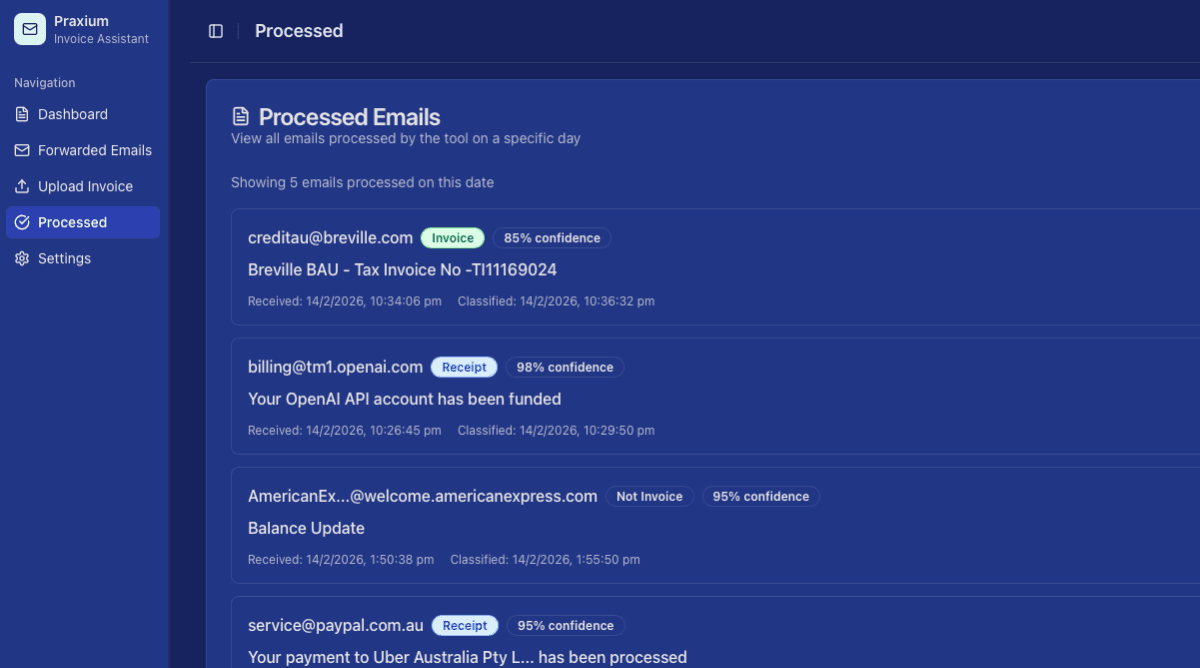
Dashboard preview

Streamline Your Invoice Management

AI invoice detection
Smart AI identifies invoices from your email automatically.

const invoiceInput=

case 'success':

return {

border: theme === 'dark' ? 'border-[rgba(34,197,94,0.4)]' : 'border-green-200',

icon: (

<svg className={'baseIconClasses'} fill="none" viewBox="0 0 14 14">

<path

d="M3.85156 7.875L6.47656 10.5L10.8516 3.5"

stroke="var(--ai-primary-color)"

strokeLinecap="round"

strokeLinejoin="round"

strokeWidth="1.5"

/>

</svg>

const invoiceInput = {

userId: context.input.uId,

type: 'ACCPAY'

taxAmount: Number((invoiceData.gst).toFixed(2)

confidence: 0.94

emailSubject: 'Tax Invoice - ...'

llmModel: 'GPT-5.2'

};

let validationResult = {

isValid: true,

errors: []

};

try {

validationResult = await validateInvoice(invoiceInput);

strokeLinejoin="round"

strokeWidth="1.5"

/>

</svg>

Daily inbox scanning
Automated daily scans ensure no invoice is missed.

Email integration
Connect Google or Microsoft email accounts seamlessly.

Xero connectivity
Direct integration with your Xero accounting software.

Data extraction
AI extracts all relevant invoice data accurately.

Validate ABN
ABR lookup • OK • ABN current and valid
Determine account
Chart of Accounts analysed • OK • Account code : 310
Xero Supplier Lookup
Match found • OK • Supplier ID: 5498

Auto-add to Xero
Invoices are automatically added to your Xero account ready for approval.

[16:37:25.637] Invoice detected

[16:37:25.638] Extracting relevant data from invoice...

[16:37:25.653] ABN located

[16:37:25.741] ABN validated against Australian Business Register

[16:37:25.979] Tax elements identified and calculated

[16:37:29.945] Xero access token validated

[16:37:30.561] Formatting data for Xero API

[16:37:30.880] Exchange rate conversion not required - account uses AUD

[16:37:30.914] Initiating secure connection via Xero API

[16:37:30.940] Creating draft invoice...

[16:37:34.436] Invoice created successfully with ID...

[16:37:34.436] Updating user dashboard with new invoice

[16:37:37.265] Success

[16:37:39.076] Moving to next email...

[16:37:39.137] Analysis complete - no invoice detected

[16:37:41.439] Moving to next email...

[16:37:53.979] Analysis complete - no invoice detected

[16:38:00.585] Moving to next email...

[16:38:01.099] Analysis complete - no invoice detected

Pricing built for every business

Join our early access program and be among the first to experience automated invoice
processing powered by AI.

Early Access Program
Limited Spots Available
Get exclusive early access to our AI-powered invoice processing platform. Help shape the future of automated accounting while enjoying special benefits.
What you'll get:
Priority access to all features
Direct influence on product development
Dedicated onboarding and support
Special early adopter pricing when we launch
No commitment required during early access

Frequently Asked Questions

Everything you need to know about Praxium Invoice Assistant and how it can transform your invoice processing

What is Praxium Invoice Assistant and who is it for?
Praxium Invoice Assistant is an AI-powered invoice automation tool designed for businesses of all sizes who want to streamline their accounts payable process. It's perfect for businesses looking to save time on manual invoice entry and reduce data entry errors.
How does the AI invoice detection work?
Our AI analyzes your emails, intelligently identifying which attachments and emails contain invoices. It distinguishes invoices from other documents like purchase orders and statements, ensuring only genuine invoices are processed.
Which email providers are supported?
We currently support Google (Gmail, Google Workspace) and Microsoft (Outlook, Office 365) email accounts.
How does the Xero integration work?
Once you connect your Xero account, invoices are automatically added with all relevant data extracted including vendor name, invoice number, date, amount, line items, and tax information. Invoice Assistant will map this data to your Xero account structure.
What happens if the AI makes a mistake?
Our AI has a high accuracy rate, but you maintain full control. All invoices are added to Xero as drafts by default, allowing you to review and approve them before they're finalized.